Cell Visualization
In this tutorial, we will lay out the graph components that constitute
cells in PNA data. A single cell_plot() recipe can be rendered as a
static figure, an interactive 3D view, or an animation.
After completing this tutorial, you will be able to:
- Choose a few cells to visualize from a population-level result.
- Load those cell graphs and compute a 3D layout.
- Choose between a spectral layout and coarsened pivot MDS (pMDS).
- Build one
cell_plot()recipe and render it as a static figure, an interactive 3D view, or an animation. - Color nodes by protein counts or by a local proximity score.
Setup
library(pixelatorR)
library(SeuratObject)
library(dplyr)
library(tidyr)
library(ggplot2)
library(patchwork)
Load data
This tutorial uses resting PBMCs from donor 1 in the dataset Peripheral
Blood Mononuclear Cells (PBMCs) from 16 healthy donors. The sample was
generated with the Proxiome Kit v2, and the file is
PBMCs_resting_S01_HG2.layout.pxl. ReadPNA_Seurat() reads that PXL
file into a Seurat object, including the proximity scores.
DATA_DIR <- "path/to/local/folder"
Sys.setenv("DATA_DIR" = DATA_DIR)
BASEURL <- paste0(
  "https://pixelgen-technologies-datasets.s3.eu-north-1.amazonaws.com/",
  "pna-datasets/v2/unknown-2026-06-09_10-17-09-4d81617b/pixelator"
)
pxl_file <- "PBMCs_resting_S01_HG2.layout.pxl"

if (!file.exists(file.path(DATA_DIR, pxl_file))) {
  download.file(
    paste0(BASEURL, "/", pxl_file),
    destfile = file.path(DATA_DIR, pxl_file),
    method = "curl"
  )
}
pg_data <- ReadPNA_Seurat(
  file.path(DATA_DIR, "PBMCs_resting_S01_HG2.layout.pxl"),
  verbose = FALSE
)
pg_data
An object of class Seurat
158 features across 771 samples within 1 assay
Active assay: PNA (158 features, 158 variable features)
 1 layer present: counts
Choosing cells to visualize
A layout is a spatial representation of the graph of one cell. The proximity scores already summarize every cell, so the practical task is to pick a handful of cells that illustrate a result. Loading every graph is unnecessary: each graph holds tens of thousands of nodes, and graphs that have not been loaded stay on disk.
Useful ways to choose those cells:
- Start from a population result. Here, CD41 and CD62P mark platelets stuck to monocytes, so we lay out monocytes and use those two proteins.
- Require enough molecules of each protein. A cell with very few CD41 or CD62P molecules will look sparse, and the spatial pattern will be hard to see.
- Pick whole cells with a high colocalization score. A small component is often a fragment, and its layout is only part of a cell.
The PXL file does not include cell-type labels. A monocyte is defined
here as a cell with at least 100 CD14 molecules, fewer than 50 CD3e
molecules, and fewer than 50 CD19 molecules. A log2_ratio of 1 means
there are twice () as many pairs as expected by chance, a
log2_ratio of 2 means there are four times () as many, and so on.
For a self-pair such as CD41/CD41, that score is clustering. For
CD41/CD62P, it is colocalization.
ProximityScores(add_marker_counts = TRUE) adds count_1 and
count_2, the molecule counts of marker_1 and marker_2.
counts <- LayerData(pg_data, layer = "counts")
monocytes <- tibble::tibble(
  component = colnames(counts),
  CD14 = as.numeric(counts["CD14", ]),
  CD3e = as.numeric(counts["CD3e", ]),
  CD19 = as.numeric(counts["CD19", ])
) %>%
  filter(CD14 >= 100, CD3e < 50, CD19 < 50)

# CD41/CD41 rows are clustering scores.
cd41_scores <- ProximityScores(pg_data, add_marker_counts = TRUE) %>%
  filter(marker_1 == "CD41", marker_2 == "CD41") %>%
  collect() %>%
  inner_join(monocytes, by = "component")

cd41_scores %>%
  ggplot(aes(count_1, log2_ratio)) +
  geom_density_2d() +
  geom_point() +
  scale_x_log10() +
  theme_minimal() +
  labs(
    x = "CD41 count",
    y = "log2_ratio (proximity score)",
    title = "Clustering of CD41 on monocytes"
  )
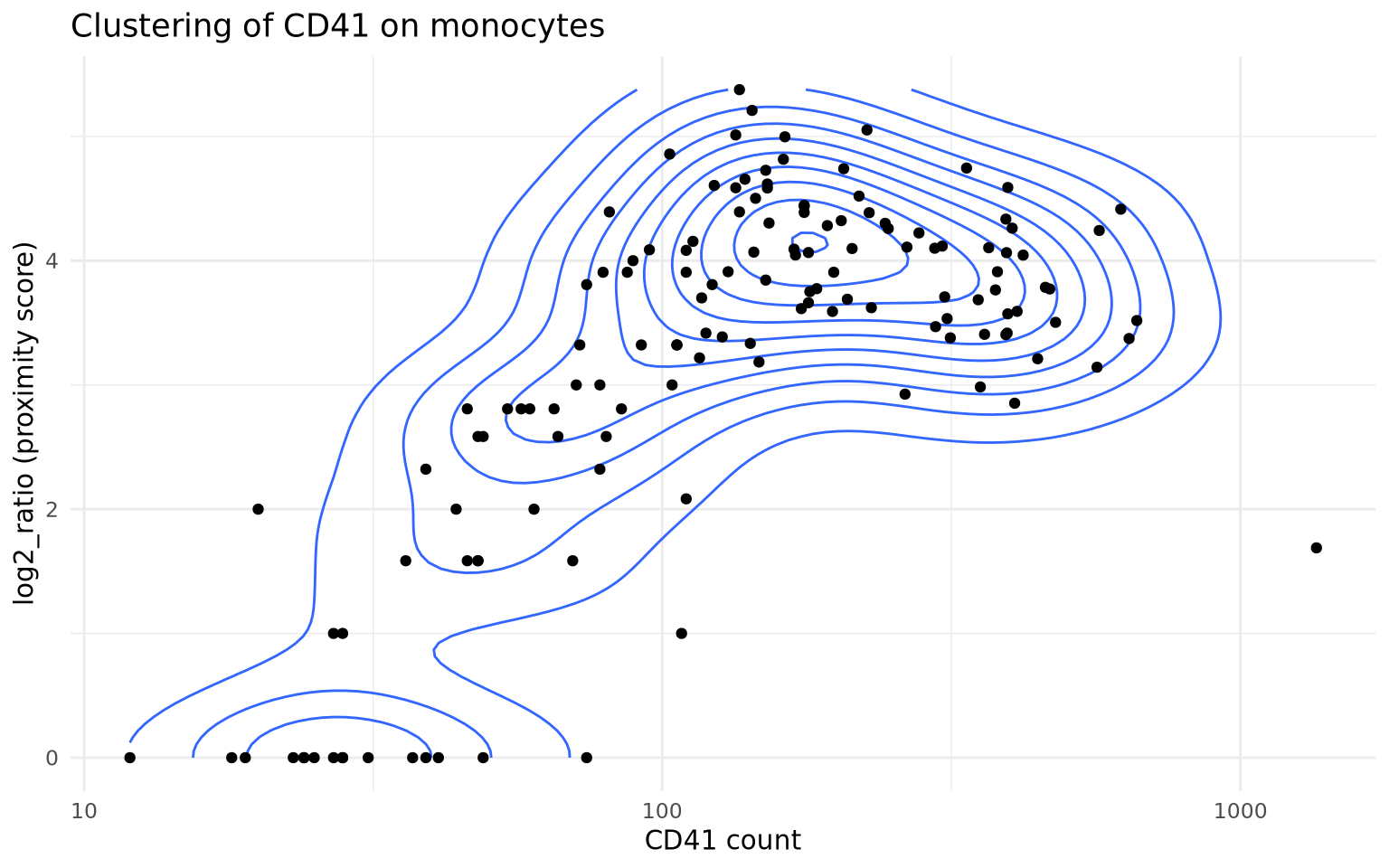
CD41 clustering is high on monocytes that carry the protein. Colocalization asks whether CD62P sits in that same region.
coloc_scores <- ProximityScores(pg_data, add_marker_counts = TRUE) %>%
  filter(marker_1 == "CD41", marker_2 == "CD62P") %>%
  collect() %>%
  inner_join(monocytes, by = "component")

coloc_scores %>%
  ggplot(aes(count_1, log2_ratio)) +
  geom_density_2d() +
  geom_point() +
  scale_x_log10() +
  theme_minimal() +
  labs(
    x = "CD41 count",
    y = "log2_ratio (proximity score)",
    title = "Colocalization of CD41 and CD62P on monocytes"
  )
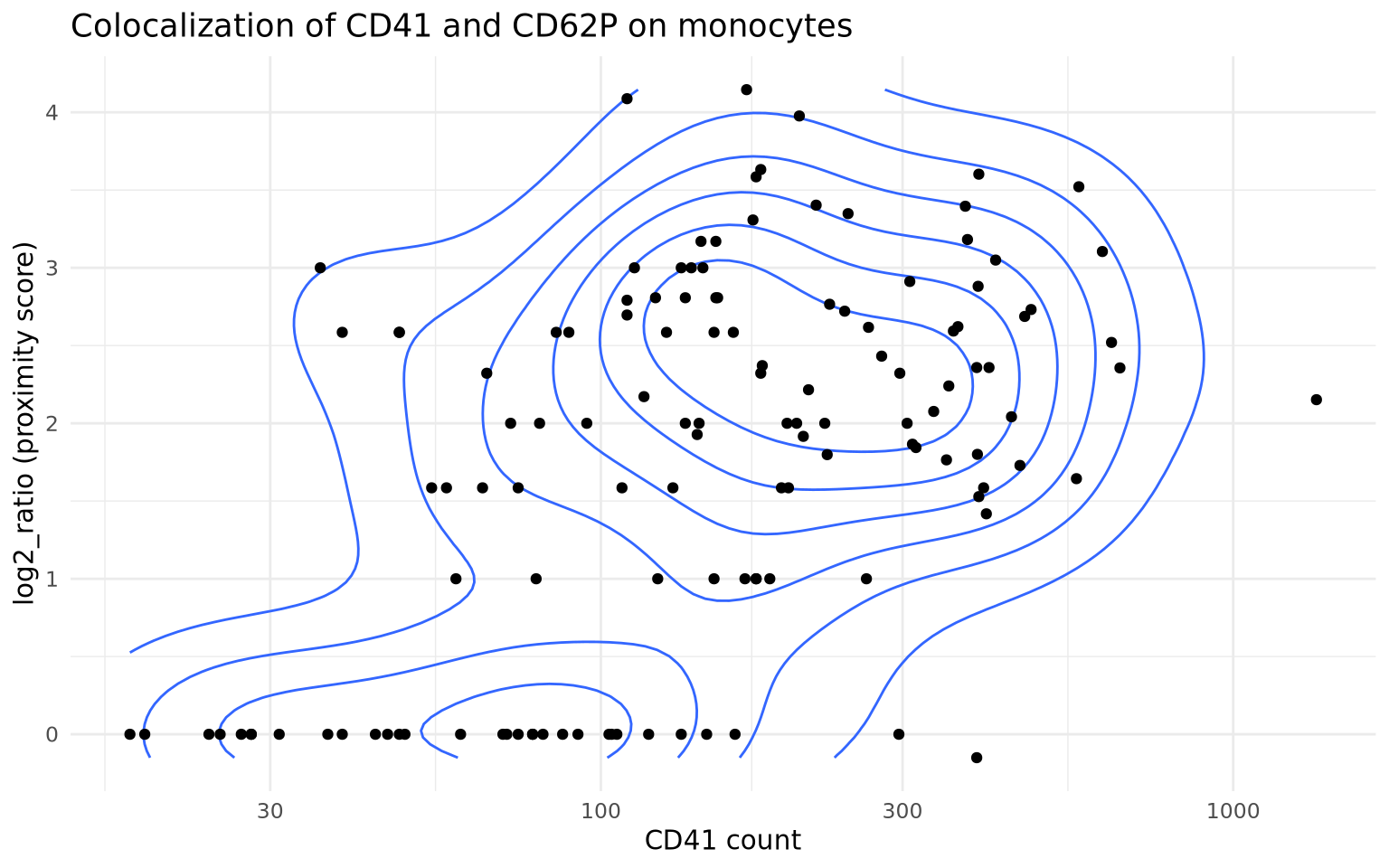
The highest colocalization scores include small components. Those
layouts are only part of a cell. n_umi is the number of molecules in
the component. We keep components with at least 70,000 molecules, at
least 150 CD41 molecules, and at least 40 CD62P molecules, then take the
four highest colocalization scores.
component_size <- as_tibble(pg_data[[]], rownames = "component") %>%
  select(component, n_umi)

plot_components <- coloc_scores %>%
  inner_join(component_size, by = "component") %>%
  filter(count_1 >= 150, count_2 >= 40, n_umi >= 70000) %>%
  arrange(desc(log2_ratio)) %>%
  slice_head(n = 4) %>%
  mutate(cell_label = paste("Monocyte", row_number())) %>%
  select(component, cell_label, log2_ratio, count_1, count_2, n_umi)

plot_components
# A tibble: 4 × 6
  component        cell_label log2_ratio count_1 count_2  n_umi
  <chr>            <chr>           <dbl>   <int>   <int>  <int>
1 5e08ab07f8dd8fe9 Monocyte 1       3.52     570      86 122835
2 4c988a5276f3a6ed Monocyte 2       3.40     377      48  71833
3 c077decfb72ce4e5 Monocyte 3       3.35     246      91  71178
4 af0a7746f71a1dfa Monocyte 4       3.17     152      75  77712
# The strongest aggregate, used for the single-cell figures below
aggregate_cell <- plot_components %>%
  slice_max(log2_ratio, n = 1, with_ties = FALSE) %>%
  pull(component)
Load cell graphs
LoadCellGraphs() builds the selected component graphs from the
edgelist in the PXL file and stores them on the Seurat object.
pg_data <- pg_data %>%
  LoadCellGraphs(cells = plot_components$component, verbose = FALSE)

CellGraphs(pg_data)[[aggregate_cell]]
A CellGraph object containing a bipartite graph with 122835 nodes and 388197 edges
Number of markers:  158
A CellGraph holds the component graph and a node-by-protein count
matrix. A layout is stored on that object once you compute one.
Components that were not requested are still NULL. If you later save
the Seurat object to RDS, the loaded graphs are saved with it.
RemoveCellGraphs() drops loaded graphs from the Seurat object. Use it
to free memory, or before loading the same cells again with different
options.
Layout methods
A layout assigns an x, y, and z coordinate to every node so that the coordinates reflect the structure of the graph. These layouts are abstract representations of the cell surface. On a well connected graph, the nodes form a continuous shell.
Two methods cover almost every cell you will want to lay out.
Spectral layout (layout_method = "spectral") is a Laplacian
eigenmap. The coordinates are the smoothest non-constant patterns of
connectivity in the graph, so nodes that are joined by short paths are
placed near each other. Spectral layout is the fastest method, and when
it succeeds it is also the most faithful layout of the cell.
Coarsened pMDS (layout_method = "cpmds") is the method to use when
a spectral layout fails. It clusters the graph with the Leiden
algorithm, creates a coarsened graph with clusters as nodes, and lays
out that much smaller graph with pivot MDS. The coordinates are then
smoothed back onto the original nodes. Pivot MDS places nodes so that
distances in the layout reflect shortest-path distances to a set of
pivot nodes. Coarsening is what makes that feasible for a graph of this
size, and it is also what makes the layout stable when connectivity is
uneven.
Spectral layout is sensitive to bottlenecks. If one part of the graph is
only weakly connected to the rest, the layout can collapse: the shell
folds into a line, a cross, or a crumpled cloud. That is a failed
layout. The cell and its proximity scores are still valid, and the right
response is to recompute that cell with coarsened pMDS. Both layouts can
live on the same CellGraph, under the names spectral_3d and
cpmds_3d.
FetchLayoutData() reads a stored layout into a tibble. Its default
layout name is wpmds_3d, so pass the name of the layout you computed.
pg_data <- pg_data %>%
  ComputeLayout(layout_method = "spectral", verbose = FALSE)

layout_overview <- FetchLayoutData(
  pg_data,
  cells = plot_components$component,
  layout_method = "spectral_3d"
) %>%
  left_join(plot_components %>% select(component, cell_label), by = "component")
A quick look at the selected cells shows whether the spectral layouts formed a shell. The plot samples 10% of the nodes.
layout_overview %>%
  mutate(cell_label = factor(cell_label, levels = plot_components$cell_label)) %>%
  group_by(component) %>%
  slice_sample(prop = 0.1) %>%
  ungroup() %>%
  cell_plot(size = 0.45) %>%
  cell_grid(cols = cell_label) %>%
  cell_illuminate()
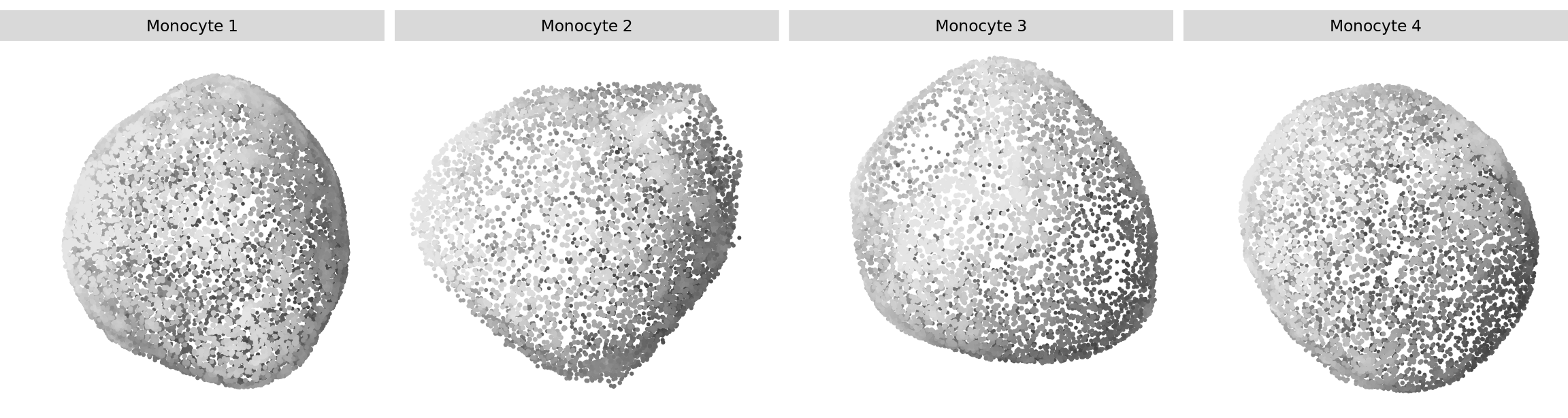
If a panel collapses, recompute that cell with coarsened pMDS. The new
layout is stored as cpmds_3d next to spectral_3d.
Both layouts can be computed for the same cell. Here the nodes are colored by their x coordinate in the spectral layout, and that same value is copied onto the coarsened pMDS layout. A node keeps its color, so you can see where each part of the cell lands in the coarsened pMDS layout. The two tables are in the same node order, which is why the coordinate can be copied by row.
comparison_label <- plot_components %>%
  filter(component == aggregate_cell) %>%
  pull(cell_label)

comparison_graph <- ComputeLayout(
  CellGraphs(pg_data)[[aggregate_cell]],
  layout_method = "cpmds",
  verbose = FALSE
)

spectral_layout <- FetchLayoutData(
  comparison_graph,
  layout_method = "spectral_3d"
) %>%
  mutate(spectral_x = x, layout = "spectral")

cpmds_layout <- FetchLayoutData(
  comparison_graph,
  layout_method = "cpmds_3d"
) %>%
  mutate(spectral_x = spectral_layout$spectral_x, layout = "coarsened pMDS")

bind_rows(spectral_layout, cpmds_layout) %>%
  mutate(layout = factor(layout, levels = c("spectral", "coarsened pMDS"))) %>%
  cell_plot(color = spectral_x, size = 0.3) %>%
  cell_grid(cols = layout) %>%
  cell_node_scale_color(colors = c("#440154", "#31688E", "#35B779", "#FDE725")) %>%
  cell_illuminate() %>%
  cell_annotation(title = comparison_label, legend_title = "Spectral x")
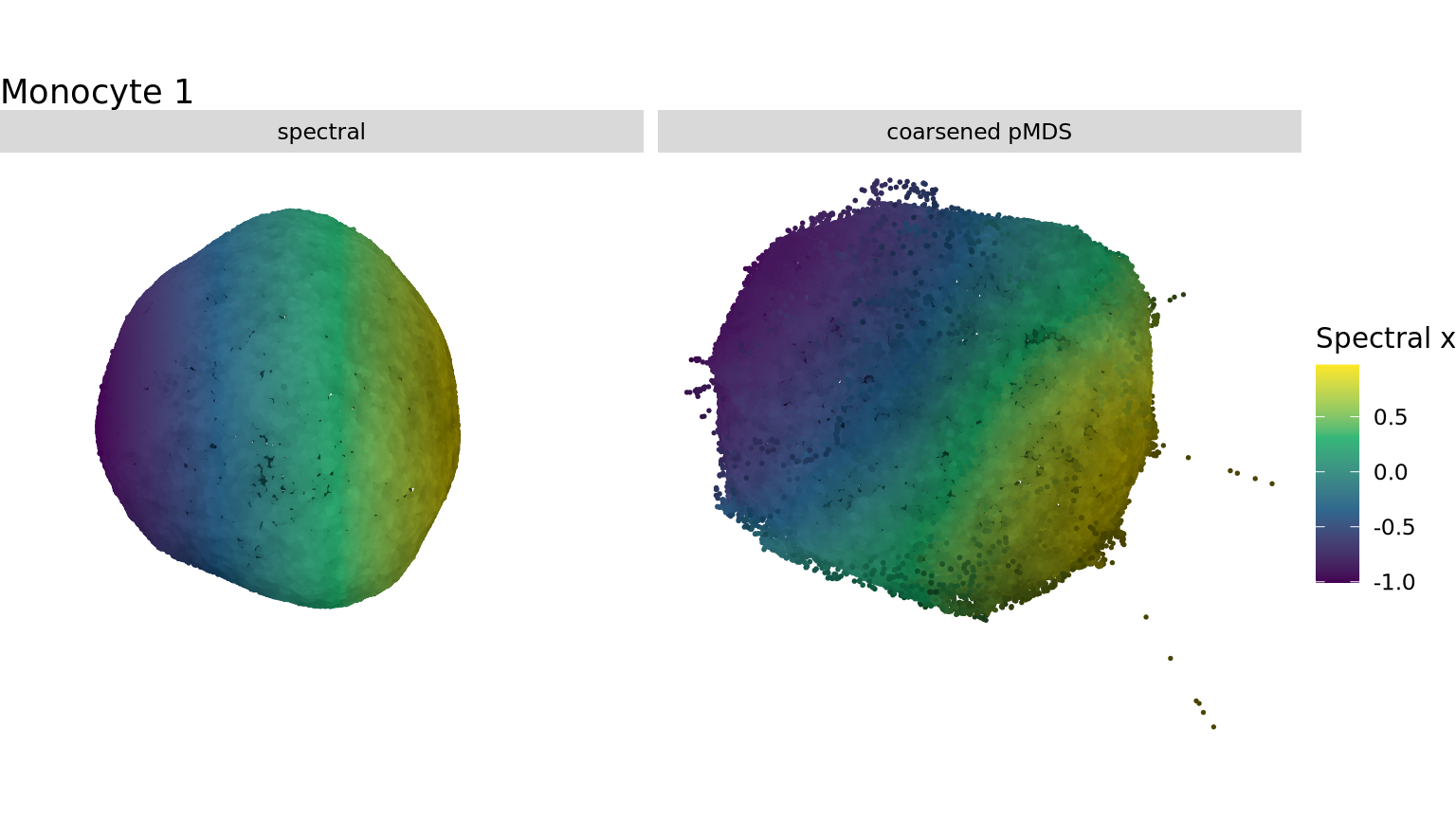
To recompute every loaded cell, call
ComputeLayout(pg_data, layout_method = "cpmds") and pass
layout_method = "cpmds_3d" to FetchLayoutData().
Plot cells with cell_plot
The best way to plot cells is to use cell_plot() and its related
functions. A cell_plot() is a plotting recipe that you add data to,
along with modifiers that change the aesthetics of the plot. For
example, cell_node_scale_color() sets the color scale,
cell_illuminate() adds shading, and cell_grid() splits the layout
into panels. Nothing is rendered until you print the recipe or pass it
to another renderer.
Printing the recipe produces a static figure. The same object can be
passed to cell_plot_interactive() or, after cell_coord_rotate(), to
cell_plot_animate(). Coordinates default to x, y, and z. Depth
sizing is on by default: nodes closer to the viewer are drawn larger.
The static figure is a projection onto x and y, so the interactive view
and the animation are what show the full shell.
Function reference
| Function | Description |
|---|---|
cell_plot() | Starts a recipe from layout data, with coordinate and aesthetic mappings. |
cell_node_scale_color() | Sets a continuous color gradient or a discrete palette. |
cell_node_scale_size() | Maps node size to a numeric range or to one size per category. |
cell_node_scale_alpha() | Maps node opacity to a numeric range or to one alpha per category. |
cell_node_depth() | Controls perspective sizing from the depth coordinate. |
cell_illuminate() | Adds directional light, volume shading, and ambient occlusion. |
cell_grid() | Splits the layout into panels by rows, columns, or both. |
cell_annotation() | Adds a title, subtitle, caption, and legend title. |
cell_theme() | Sets the background and text styling. |
cell_coord_rotate() | Rotates the layout around the x, y, or z axis. |
cell_plot_interactive() | Renders an interactive 3D view with the rgl package. |
cell_plot_animate() | Renders a rotating animation as a GIF or a video. |
One cell, several proteins
Monocytes carry CD14 across the surface. On a monocyte-platelet aggregate, CD41 and CD62P should occupy the same region. Clustering is one protein sitting next to copies of itself. Colocalization is two proteins sitting in that same region.
You can display multiple proteins in the same plot, for example by
splitting them into one panel each. pivot_longer() stacks the counts
into a single column, and cell_grid() uses that column to make the
panels. Storing count as a factor makes the legend list each count,
and that scale is trained once across the panels.
cell_node_scale_alpha() draws nodes with a count of 0 more faintly.
The same colors and panels are used for the interactive view and the
animation below. The animation keeps this alpha, and the interactive
view leaves it off so the widget stays responsive.
protein_data <- FetchLayoutData(
  pg_data,
  cells = aggregate_cell,
  vars = c("CD14", "CD41", "CD62P"),
  layout_method = "spectral_3d"
) %>%
  pivot_longer(
    cols = c(CD14, CD41, CD62P),
    names_to = "protein",
    values_to = "count"
  ) %>%
  mutate(
    protein = factor(protein, levels = c("CD14", "CD41", "CD62P")),
    node_alpha = if_else(count > 0, "detected", "absent"),
    count = factor(count)
  )

protein_plot <- protein_data %>%
  cell_plot(color = count, size = 0.6, alpha = node_alpha) %>%
  cell_grid(cols = protein) %>%
  cell_node_scale_color(colors = c("#F0F0F0", "#B2182B")) %>%
  cell_node_scale_alpha(alphas = c(detected = 1, absent = 0.45)) %>%
  cell_illuminate(lock_light = TRUE) %>%
  cell_annotation(
    title = "Protein abundance on a monocyte-platelet aggregate",
    legend_title = "Count"
  )

protein_plot
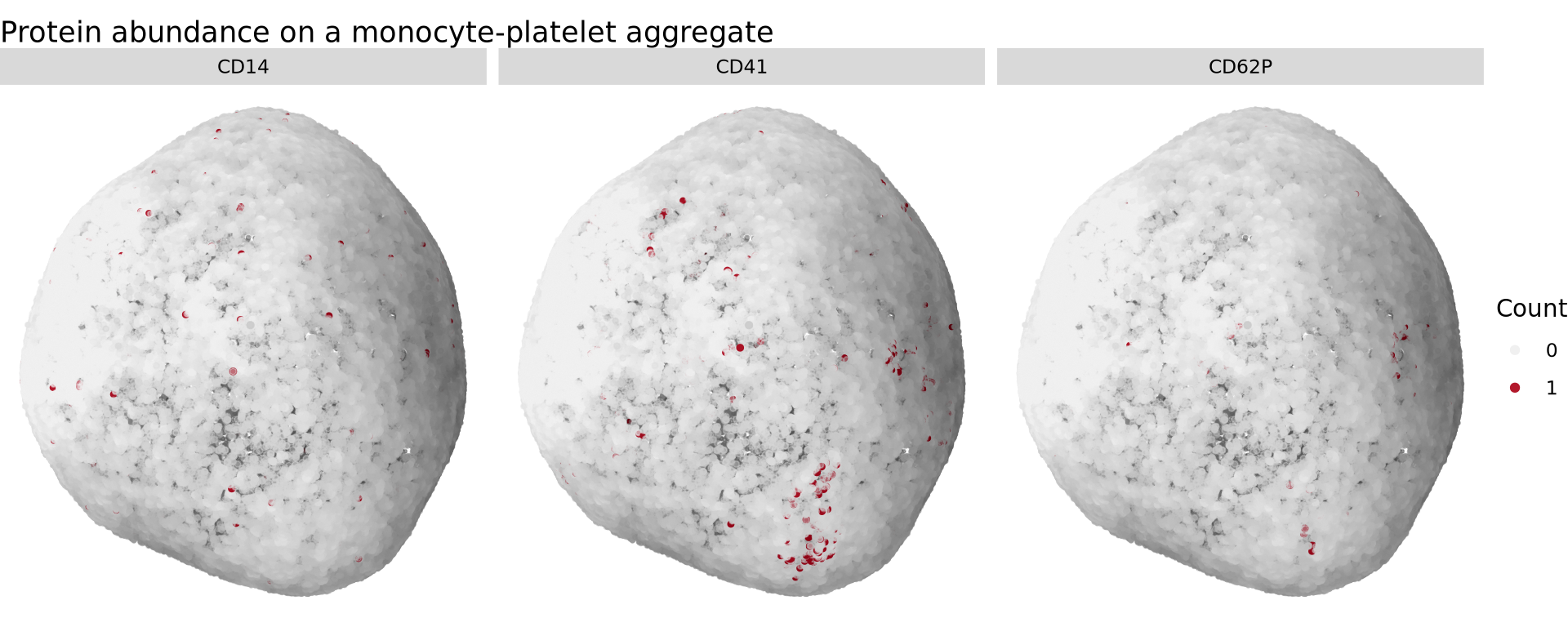
CD14 is spread across the surface. CD41 and CD62P occupy the same regions, which is easier to see when those nodes are drawn larger.
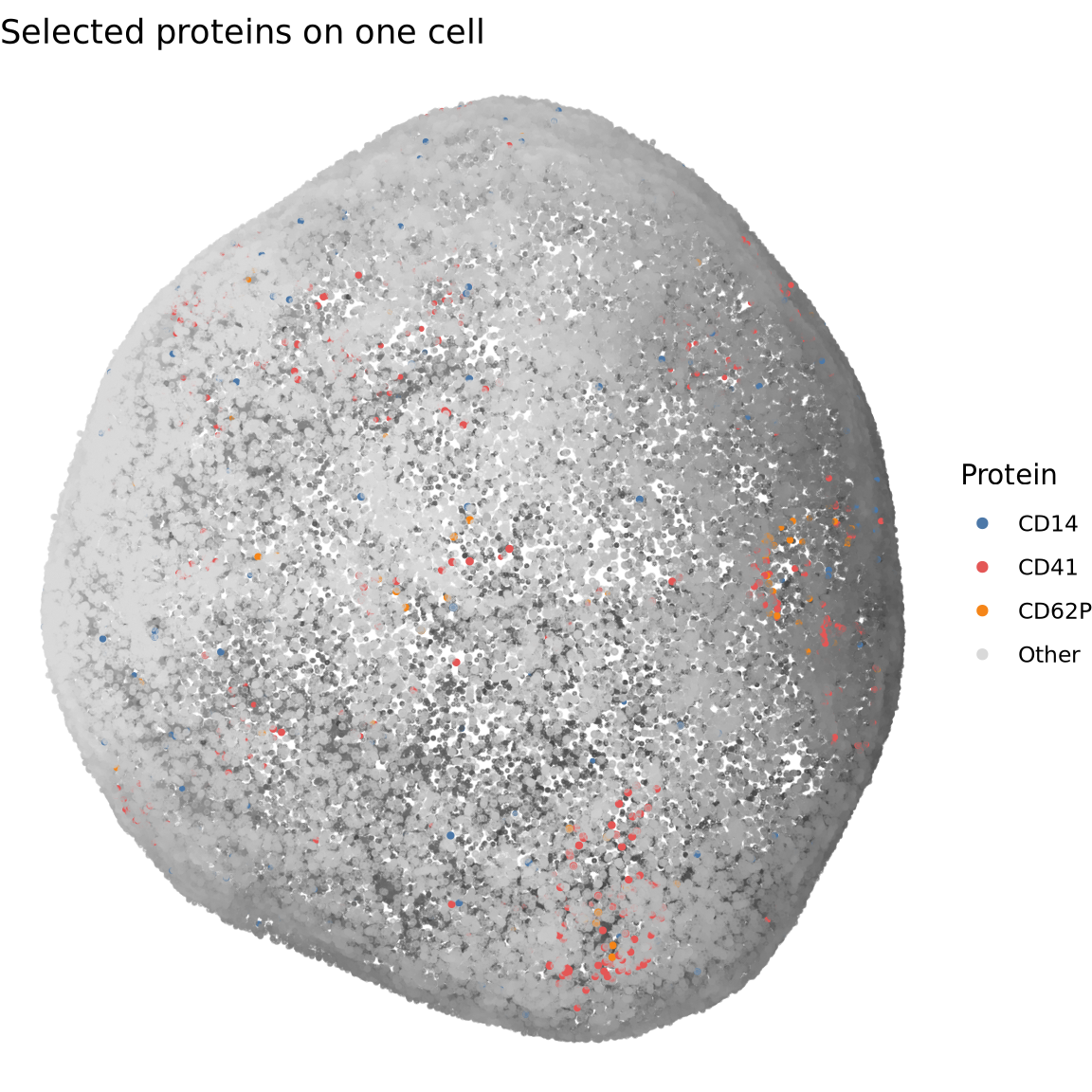
You can also display multiple markers by giving them different colors.
FetchLayoutData(add_marker = TRUE) adds the protein identity of each
node, so several proteins can share one panel. Nodes for the proteins we
care about keep their name, and every other node is labeled "Other".
cell_plot(illumination_mask = ...) turns shading on only for those
other nodes, so the selected proteins are not shadowed.
cell_node_scale_alpha() gives "Other" a lower alpha, which keeps
those nodes from covering the proteins.
FetchLayoutData(
  pg_data,
  cells = aggregate_cell,
  layout_method = "spectral_3d",
  add_marker = TRUE
) %>%
  mutate(
    marker = if_else(
      marker %in% c("CD14", "CD41", "CD62P"),
      marker,
      "Other",
      missing = "Other"
    ),
    marker = factor(marker, levels = c("CD14", "CD41", "CD62P", "Other")),
    illuminate_node = marker == "Other"
  ) %>%
  cell_plot(
    color = marker,
    size = 0.5,
    alpha = marker,
    illumination_mask = illuminate_node
  ) %>%
  cell_node_scale_color(colors = c(
    CD14 = "#4C78A8",
    CD41 = "#E45756",
    CD62P = "#F58518",
    Other = "grey85"
  )) %>%
  cell_node_scale_alpha(alphas = c(
    CD14 = 1,
    CD41 = 1,
    CD62P = 1,
    Other = 0.45
  )) %>%
  cell_illuminate() %>%
  cell_annotation(title = "Selected proteins on one cell", legend_title = "Protein")
The same recipe, interactive and animated
cell_plot_interactive() draws the same panels as a 3D widget. Drag to
rotate and scroll to zoom. Panels in the grid share one camera, so they
turn together. This view uses the colors and sizes from the recipe and
leaves out the alpha mapping, which keeps the widget responsive. It also
ignores depth sizing. The widget needs the rgl package.
protein_data %>%
  cell_plot(color = count, size = 0.6) %>%
  cell_grid(cols = protein) %>%
  cell_node_scale_color(colors = c("#F0F0F0", "#B2182B")) %>%
  cell_illuminate(lock_light = TRUE) %>%
  cell_annotation(
    title = "Protein abundance on a monocyte-platelet aggregate",
    legend_title = "Count"
  ) %>%
  cell_plot_interactive()
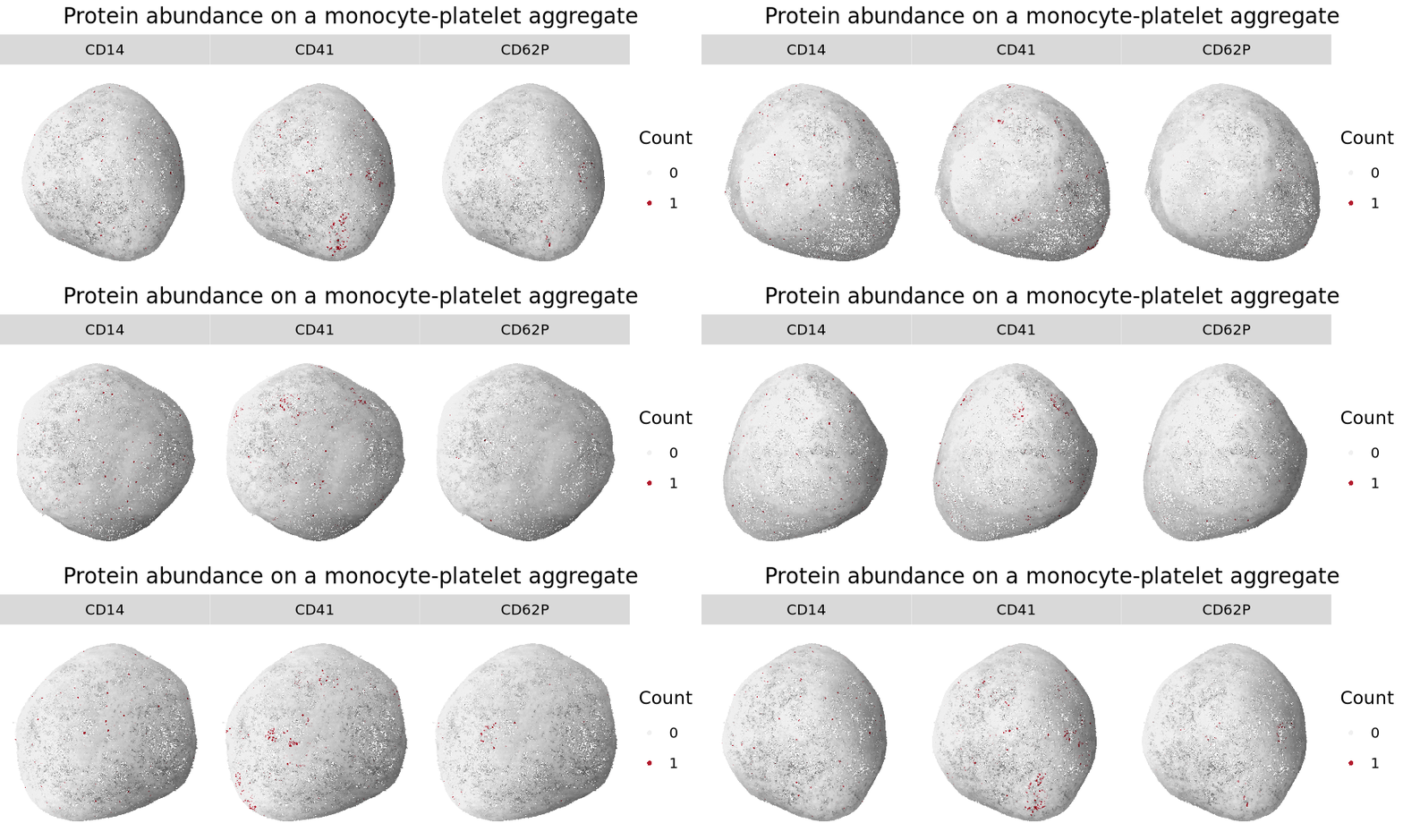
cell_coord_rotate() describes the turn, and cell_plot_animate()
renders it from the same recipe. The file extension selects the format:
.gif uses the gifski package, and any other extension, including
.mp4, uses the av package. Installing ragg speeds up the frame
rendering.
max_degree = 360 is one full turn around axis. "y" turns the cell
from left to right. frames and fps set how many frames are drawn and
how fast they play, and width and height set the pixel size.
lock_light = TRUE, which is already set on protein_plot, keeps the
light fixed to the viewer while the cell turns. Static plots and the
interactive widget use the light on the unrotated coordinates, so this
setting only changes the animation.
protein_plot %>%
  cell_coord_rotate(axis = "y", max_degree = 360) %>%
  cell_plot_animate(
    file = "cd41_cd62p_animation.gif",
    frames = 120,
    fps = 20,
    width = 900,
    height = 360
  )
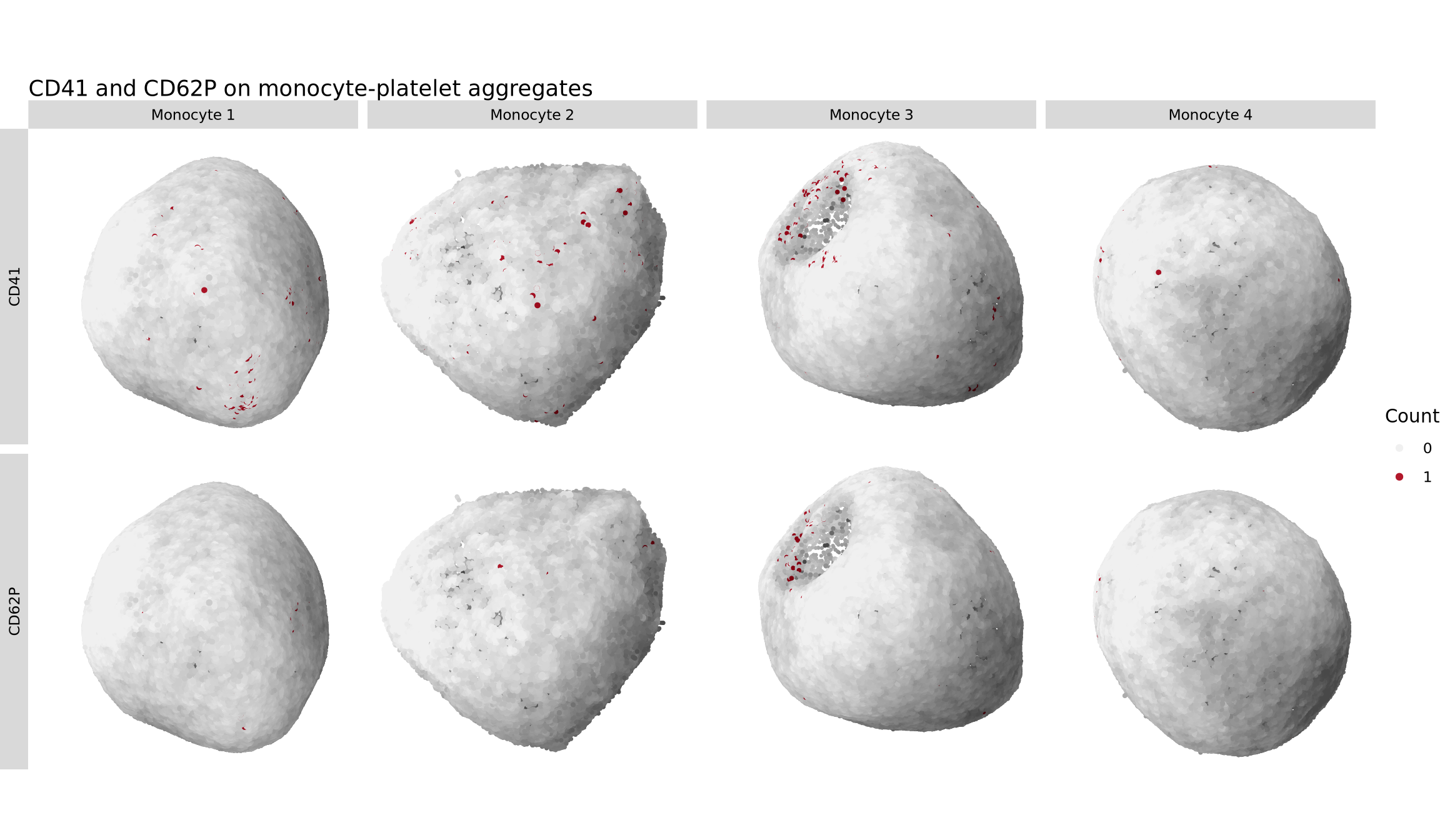
Several cells
The same recipe draws a grid of cells. Here each column is one of the four monocyte-platelet aggregates, and each row is a platelet protein. These cells are the strongest colocalization examples. They are a small set.
FetchLayoutData(
  pg_data,
  cells = plot_components$component,
  vars = c("CD41", "CD62P"),
  layout_method = "spectral_3d"
) %>%
  left_join(plot_components %>% select(component, cell_label), by = "component") %>%
  pivot_longer(
    cols = c(CD41, CD62P),
    names_to = "protein",
    values_to = "count"
  ) %>%
  mutate(
    count = factor(count),
    cell_label = factor(cell_label, levels = plot_components$cell_label)
  ) %>%
  cell_plot(color = count, size = 0.6) %>%
  cell_grid(rows = protein, cols = cell_label) %>%
  cell_node_scale_color(colors = c("#F0F0F0", "#B2182B")) %>%
  cell_illuminate() %>%
  cell_annotation(title = "CD41 and CD62P on monocyte-platelet aggregates", legend_title = "Count")
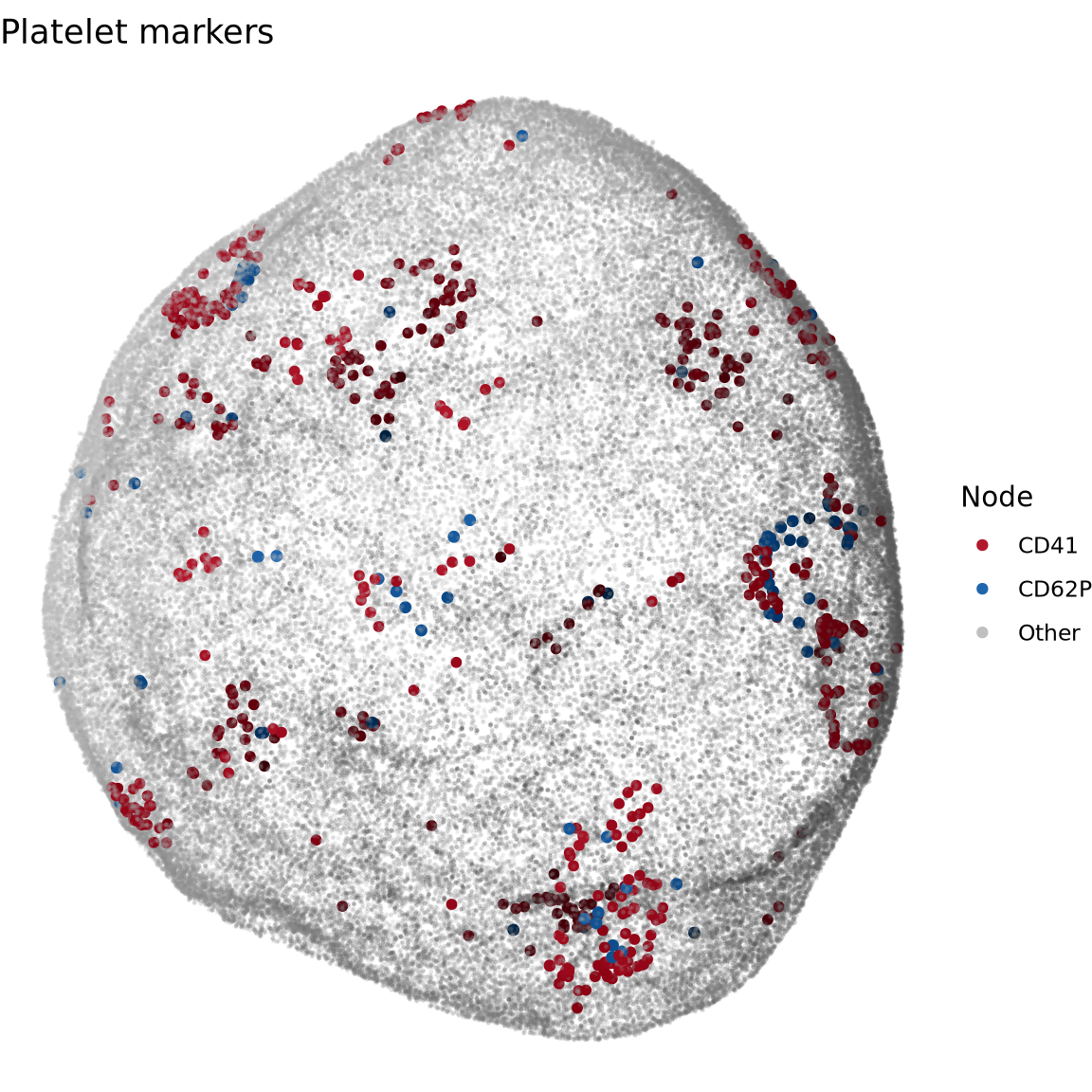
Highlighting a protein
Color, size, and alpha can all encode a category. add_marker = TRUE
adds the protein identity of each node. Mapping size and alpha makes the
CD41 and CD62P nodes large and opaque and fades the rest of the cell. A
size mapping replaces the automatic depth sizing, so depth = NULL
turns that sizing off explicitly. cell_node_scale_size() and
cell_node_scale_alpha() take one value per level.
FetchLayoutData(
  pg_data,
  cells = aggregate_cell,
  layout_method = "spectral_3d",
  add_marker = TRUE
) %>%
  mutate(
    platelet = case_when(
      marker == "CD41" ~ "CD41",
      marker == "CD62P" ~ "CD62P",
      TRUE ~ "Other"
    )
  ) %>%
  cell_plot(color = platelet, size = platelet, alpha = platelet, depth = NULL) %>%
  cell_node_scale_color(colors = c(CD41 = "#B2182B", CD62P = "#2166AC", Other = "grey75")) %>%
  cell_node_scale_size(sizes = c(CD41 = 1.4, CD62P = 1.6, Other = 0.25)) %>%
  cell_node_scale_alpha(alphas = c(CD41 = 1, CD62P = 1, Other = 0.12)) %>%
  cell_illuminate() %>%
  cell_annotation(title = "Platelet markers", legend_title = "Node")
Local proximity scores
The cell-level log2_ratio says whether CD41 is clustered on a cell,
and whether CD41 and CD62P colocalize. It does not say where on the cell
that happens. A local proximity score answers the where.
ComputeLPS() scores every node. For a node , the score is
is the observed marker count in the neighborhood of node . is the count expected from how common that marker is on the graph. is the neighborhood radius in edges: the neighborhood contains every node that can be reached by walking at most edges. The default is , and the smallest allowed value is 2. A larger scores a wider patch of the cell and a smaller scores a tighter one. The term is a pseudocount, so a neighborhood with very few molecules does not dominate the ratio.
mode = "self-clustering" is the default. It scores each requested
marker on its own and stores a node-by-marker matrix in a layer named
"lps". mode = "all" asks whether every marker in a set is present
together in the neighborhood, and stores one score per node in the node
metadata. mode = "any" scores the combined abundance of the set, which
is useful when any member of the set is enough to mark a region.
Sparse proteins make poor plots. A protein present as only a few molecules produces neighborhoods that are almost empty, and the score then draws an artificial, noisy pattern.
mode = "all" on a protein spread across the surface together with a
clustered protein follows the clustered protein. The score marks where
the two proteins colocalize. It does not show that they co-cluster, and
it does not show that they share a pole.
The count view colors the nodes that are CD41 molecules. The local score colors every node by how strongly CD41 is enriched around it, so the clustered region stays visible in the spaces between those molecules.
pg_data <- pg_data %>%
  ComputeLPS(markers = "CD41", name = "lps", verbose = FALSE)

cd41_counts <- FetchLayoutData(
  pg_data,
  cells = aggregate_cell,
  vars = "CD41",
  layout_method = "spectral_3d"
)

cd41_lps <- FetchLayoutData(
  pg_data,
  cells = aggregate_cell,
  vars = "CD41",
  layer = "lps",
  layout_method = "spectral_3d"
)

lps_limit <- max(abs(cd41_lps$CD41), na.rm = TRUE)

p_counts <- cd41_counts %>%
  cell_plot(color = CD41, size = 0.6) %>%
  cell_node_scale_color(colors = c("#F0F0F0", "#B2182B")) %>%
  cell_illuminate() %>%
  cell_annotation(title = "CD41 count", legend_title = "Count")

p_lps <- cd41_lps %>%
  cell_plot(color = CD41, size = 0.6) %>%
  cell_node_scale_color(
    colors = c("#2166AC", "#F7F7F7", "#B2182B"),
    limits = c(-lps_limit, lps_limit)
  ) %>%
  cell_illuminate() %>%
  cell_annotation(title = "CD41 local proximity", legend_title = "log2 ratio")

wrap_plots(autoplot(p_counts), autoplot(p_lps))
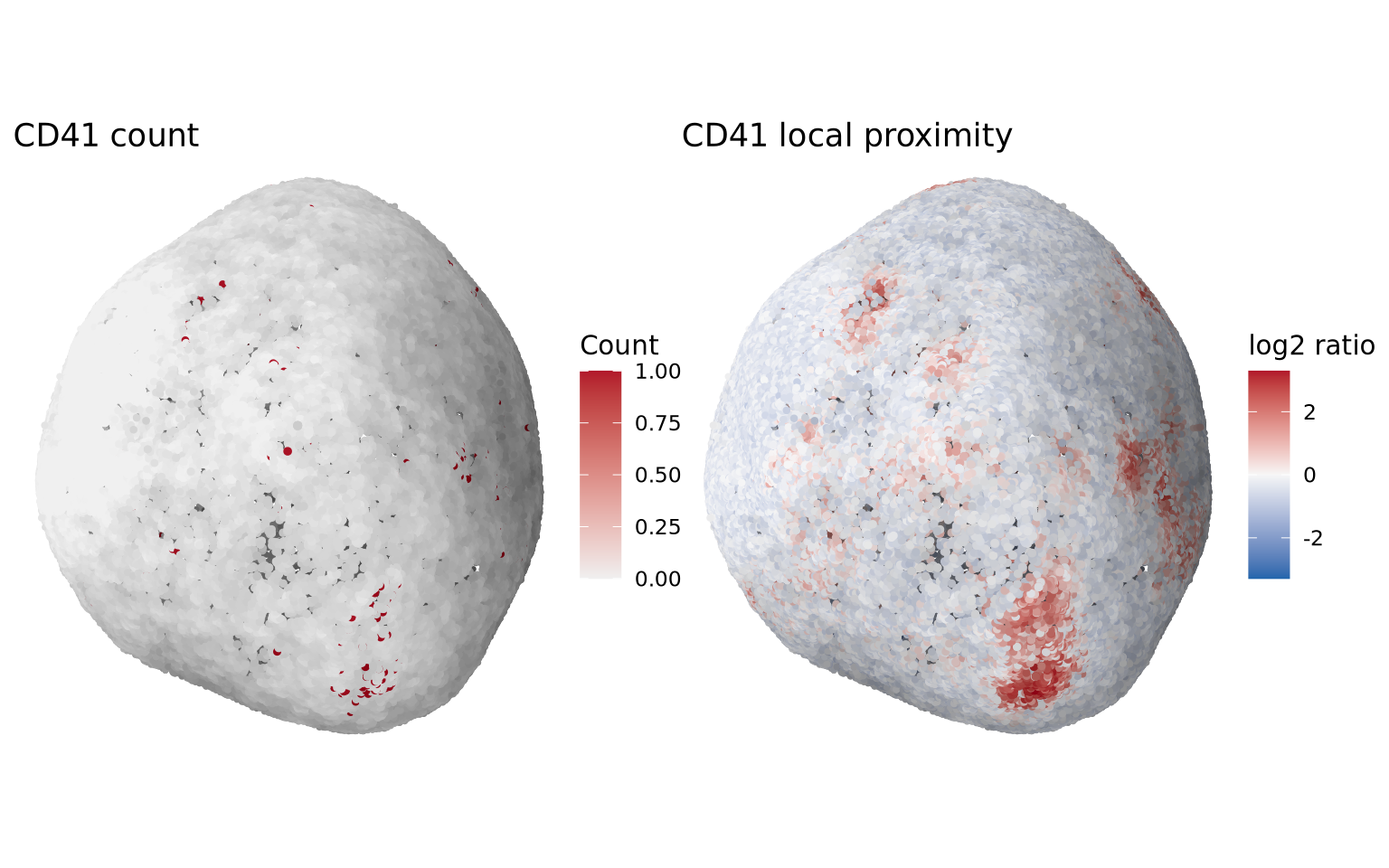
The symmetric limits keep zero, the score of a neighborhood that
matches the random expectation, at the middle of the color scale.
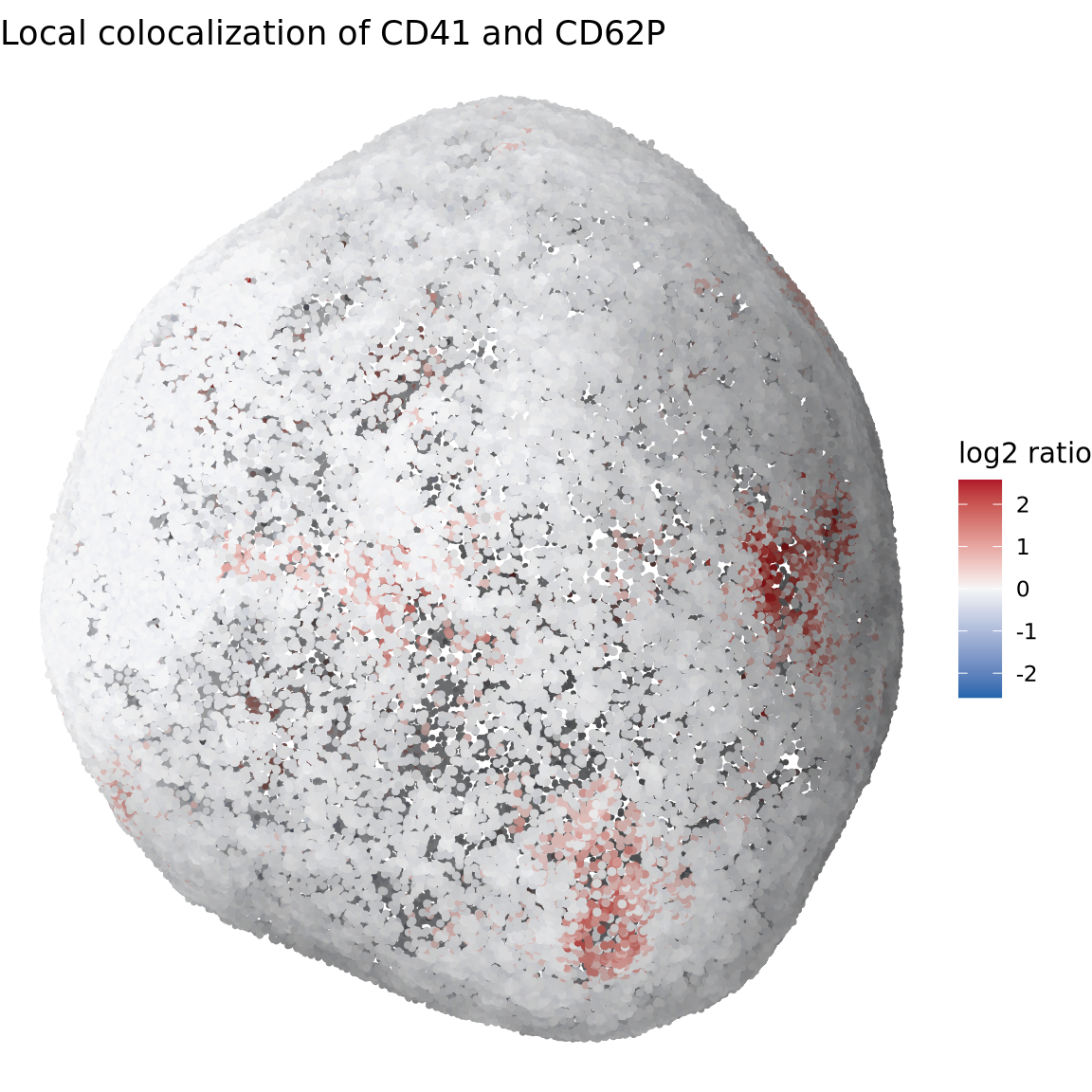
The same function scores colocalization. With mode = "all" and both
CD41 and CD62P, a high score marks nodes whose neighborhood contains
both proteins. The result is stored in the node metadata under the name
we pass, so FetchLayoutData() reads it as an ordinary column.
pg_data <- pg_data %>%
  ComputeLPS(
    markers = c("CD41", "CD62P"),
    mode = "all",
    name = "cd41_cd62p",
    verbose = FALSE
  )

cd41_cd62p <- FetchLayoutData(
  pg_data,
  cells = aggregate_cell,
  vars = "cd41_cd62p",
  layout_method = "spectral_3d"
)

coloc_limit <- max(abs(cd41_cd62p$cd41_cd62p), na.rm = TRUE)

cd41_cd62p %>%
  cell_plot(color = cd41_cd62p, size = 0.6) %>%
  cell_node_scale_color(
    colors = c("#2166AC", "#F7F7F7", "#B2182B"),
    limits = c(-coloc_limit, coloc_limit)
  ) %>%
  cell_illuminate() %>%
  cell_annotation(
    title = "Local colocalization of CD41 and CD62P",
    legend_title = "log2 ratio"
  )
Summary
In this tutorial, we picked a few monocytes with high CD41 and CD62P, the signature of a monocyte-platelet aggregate, instead of trying to lay out the whole population. Spectral layout is the first method to try. When a graph with a bottleneck makes that layout collapse, coarsened pMDS is the replacement, and a collapsed layout leaves the underlying scores intact.
One cell_plot() recipe then produced the static figures, the
interactive views, and the animation. Coloring by the protein count
shows where the molecules sit. Coloring by a local proximity score shows
the neighborhood where that protein, or a pair of proteins, is enriched.