Algorithms
This section aims to explain briefly some of the algorithms used in pixelator. For extended explanations, if relevant, we try to include references in each sub-section.
Spatial scores
Spatial structure can be challenging to describe in simple terms, particularly when assessing these structures across thousands of cells and numerous proteins.
PNA data, spatial scores are used to analyze spatial relationships between proteins in cells. These scores are helpful to understand global spatial patterns within a cell or among cell populations and can be used to measure differences between cell populations or samples. The score simply measures spatial patterns by comparing observed spatial patterns against what would occur by random chance.
PNA Proximity Scores
The Proximity scores quantify the spatial correlation between pairs of proteins, allowing us to hypothesize about
spatial patterns on the cell surface, such as protein polarization, clustering, and protein complex formation.
To understand these scores, it’s helpful to first consider how a cell is represented in a Protein Network Assay (PNA)
data set.
In a Protein Network Assay data set, a cell is represented as a graph, where each node represents a single protein,
and the edges between nodes indicate spatial proximity—i.e., proteins that are located close to one another on the cell
surface.
Spatial correlation between pairs of proteins is measured by counting the edges connecting them, yielding a number
called the join count. If the join count for a protein pair is
high, it could indicate that these proteins are spatially correlated on the cell surface. However, we cannot
immediately draw this conclusion, because the join count is influenced by the abundance of the two proteins.
For instance, if both proteins are highly abundant, there is a higher chance of observing many edges between them
(a high join count) simply due to their greater availability.
To account for this, the Proximity scores compare the observed join count to the expected join count
(join_count_expected_mean) under random conditions, accounting for their relative abundances.
This adjustment aims to make the score reflect true spatial correlation rather than random chance.
The expected join count is estimated using random permutations. In each permutation, protein labels (node identifiers)
are shuffled while preserving the graph structure, including edge placement. For each shuffled graph, the join count
between protein pairs is recalculated. Repeating this process generates a distribution of join counts under random
conditions. From this distribution, we calculate the join_count_expected_mean (the average expected join count)
and the join_count_expected_sd (the standard deviation of these counts). These values provide a baseline for
determining whether the observed join count deviates significantly from random expectation.
With these three values—the observed join_count, the join_count_expected_mean, and the
join_count_expected_sd — we can compute the Proximity scores.
The first score is a Z-score, which measures how far the observed edge count is from the expected value,
measured in standard deviations. The formula for the Z score is:
Where:
x is the observed join_count (the actual number of edges)
μ is the join_count_expected_mean (the average number of edges from the permutations)
σ is the join_count_expected_sd (the standard deviation of the permuted edge counts)
This Z-score indicates how unusual or significant the observed spatial proximity between a protein pair is,
compared to what would be expected by random chance.
The second score, called the log2_ratio, is defined by the following formula:
Where:
x is the observed join_count (the actual number of edges)
μ is the join_count_expected_mean (the average number of edges from the permutations)
The log2_ratio is the log2-transformed ratio between the observed join count and the expected join count.
Interpretation of the Z score and the log2_ratio:
Negative score: Suggests that the observed number of edges is lower than the expected number of edges between two
proteins. This could indicate a spatial anti-correlation.
Score of 0: Suggests that the observed number of edges is the same as the expected number of edges between two proteins.
Positive score: Suggests that the observed number of edges is higher than the expected number of edges between two
proteins. This could indicate a spatial correlation.
The sign of the two scores is always the same, for instance, if the Z score is positive, the log2_ratio is also
positive. However, the magnitude of the two scores can differ substantially. The Z score tends to be more extreme for
highly abundant protein pairs, reflecting the increased precision in the measurement. The log2_ratio is easier to
interpret. For example, a log2_ratio of 1 means that we observe 2^1, or twice as many edges between the pair as would
be expected by random chance while a log2_ratio of -1 means that we observe 2^-1, or half as many edges between the
pair as would be expected by random chance.
The Pixelator data processing pipeline saves Z scores and log-ratios for all detected protein pairs in all cells in the
proximity table. This includes pairs where the two proteins are the same (A = B), where the Proximity score measures
the spatial self-correlation of a protein.
Local
Local ("gi"), also known as Getis-Ord statistic, is a statistic used to find regions of a given study area where some measured variable of interest clusters. A classical application of this statistic is to identify local spatial autocorrelation patterns or "hot spots" where the variable of interest takes higher or lower values than expected. The study area is typically represented as a map, with measurements taken at specific sites. Using information about the relative distances between the sites, we can define local neighborhoods around each site. The local statistic then quantifies the degree to which the variable of interest clusters within these neighborhoods relative to the entire study area.
In MPX data analysis, the study area is a graph and the measured values are protein marker counts. Here, the marker counts are found in the nodes of the graph, and while we do not know the exact spatial positions of the nodes, we can define neighborhoods using the edges of the graph instead. One useful application of local in this context is to identify regions of a cell component graph where a marker of interest has a higher abundance than expected which is the case for polarization events.
Low-abundance markers can be of significant interest but are typically sparsely distributed in a cell component graph, making it challenging to identify and visualize spatial patterns such as polarization events. By summarizing abundance information across neighborhoods, the local statistic reduces the limitations of sparse data and becomes a valuable tool for creating more interpretable 3D visualizations of polarized marker expression.
Definition
Local is a Z-score that quantifies the deviation of the observed local marker expression from the expected expression under the null hypothesis of no spatial clustering. The sign of the score indicates whether the observed marker counts are higher or lower than expected, thus identifying hot and/or cold spots.
The local metric is calculated using the following formula (Ord and Getis, 1995, equation 6):
where
and
In this equation for , the condition that is central. An alternative definition, denoted ("gstari") relaxes this constraint, by including as a neighbor of itself. This statistic is expressed as (Ord and Getis, 1995, equation 7):
where
and
Both methods ("gi" and "gstari") are implemented in the pixelator (Python) and pixelatorR (R) analysis tool kits.
If we apply local or local on cell component data, corresponds to node counts for a selected protein marker. The statistic is calculated for a single node , using information about protein marker abundance () in the local neighborhood of . This neighborhood could for example consist of the direct neighbors to in the graph. We can also expand the neighborhood around to include nodes that are up to steps away. The effect of increasing the neighborhood size is that the spatial scale is increased, and we can identify larger spatial patterns in the graph. For visualization purposes, increasing can be an effective strategy to highlight large spatial patterns such as polarization events.
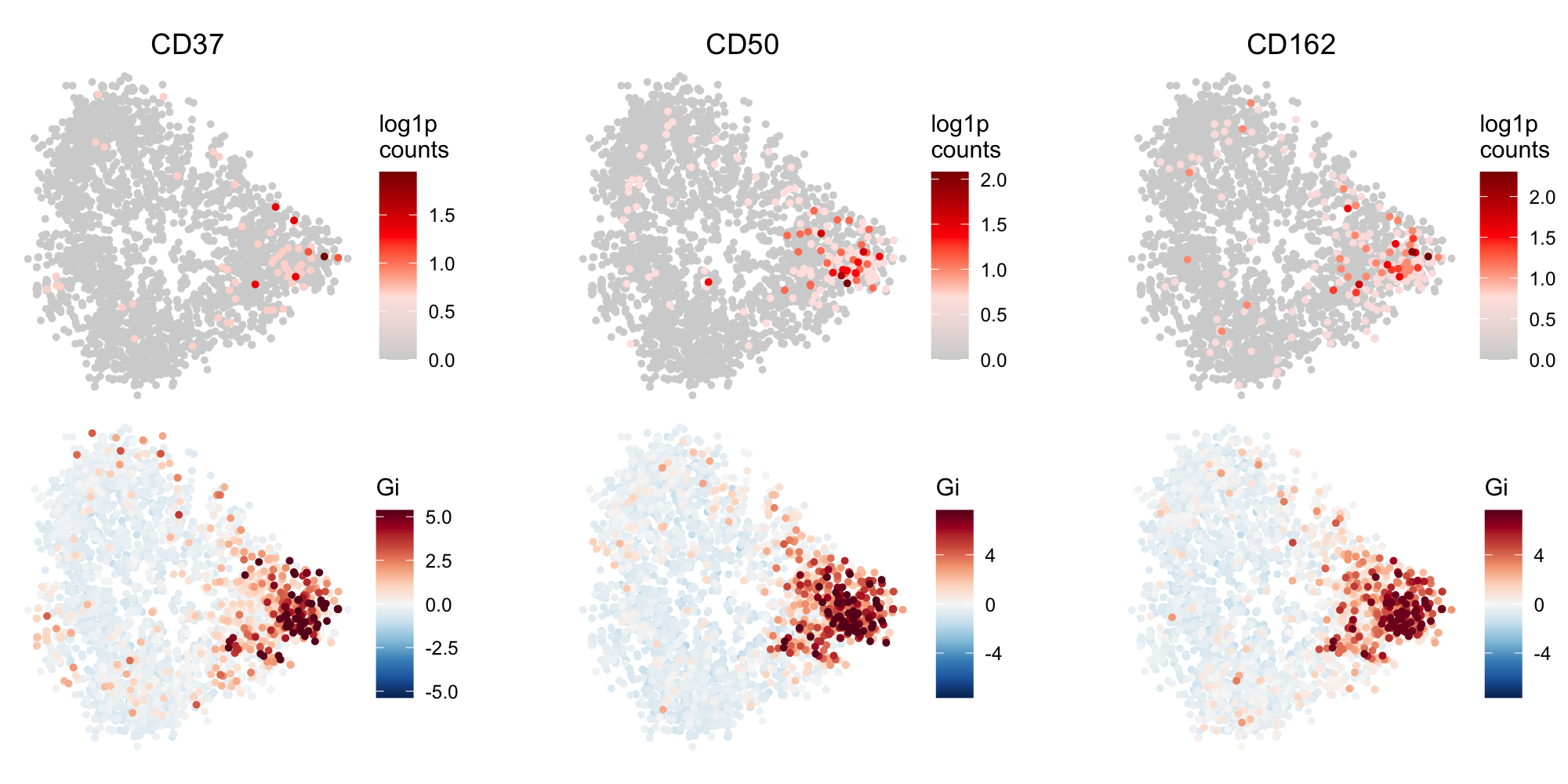 Local G scores reveal a polarization pattern in a cell component graph. The figure displays data
for three protein markers: CD37, CD50, and CD162. The top row presents the log1p-transformed counts
for each marker, while the bottom row illustrates the corresponding local G scores. Each point
corresponds to a node in the graph.
Local G scores reveal a polarization pattern in a cell component graph. The figure displays data
for three protein markers: CD37, CD50, and CD162. The top row presents the log1p-transformed counts
for each marker, while the bottom row illustrates the corresponding local G scores. Each point
corresponds to a node in the graph.
Weights in Local
The marker counts in nodes of a component graph are correlated with the degree of the nodes. If this is not accounted for, high degree nodes will contribute more to the statistic. Additionally, if we set to a value larger than 1 to include neighbors that are more than 1 step away from , we need to assign lower weights to nodes that are further away. For these reasons, the Local G algorithm that we provide in pixelator (Python) and pixelatorR (R) also computes edge weights between and its neighbors (). These edge weights are based on transition probabilities between nodes, and aim to correct for the degree bias and the distance between nodes within the neighborhood.
Layouts
Cell component graphs can be visualized in 3D layouts using graph drawing techniques. These often aim to create layouts that are visually intuitive, making it easier to identify and interpret group structures and relationships among nodes, highlighting key features such as clusters, hierarchies, and pathways within the data. For instance, in social network analysis, it is common to draw a 2D layout of the network that highlights community structure. However, MPX graphs are distinct from many other types of graphs because they contain information about spatial relationships. Here, the goal is to find a 3D layout of the graph that gives an abstract representation of the structure of the cell.
Pixelator offers options to compute layouts for each MPX component in a data set using three different algorithms: Fruchterman-Reingold (FR), Kamada-Kawai (KK), and pivot Multidimensional Scaling (pMDS). The FR and KK algorithms are force-directed methods that assign forces to edges and nodes, and then allow these forces to repel and attract each other until the nodes reach a mechanical equilibrium. A major limitation with force-directed algorithms is the high running time, which in general is considered to run in cubic time O(N^3). This limitation presents a computational challenge as an MPX data set consists of hundreds to thousands of relatively large graphs. For additional details on these methods, please refer to the following articles:
The pMDS technique, which is the default graph drawing method in Pixelator, overcomes the running time limitations with force-directed algorithms. It builds on the same principles as classical multidimensional scaling ( MDS), a widely studied method for graph drawing that converts distances between pairs of nodes into a configuration of points in an abstract Euclidean space. In brief, given the shortest path distances between each pair of nodes in the graph, the MDS technique attempts to place each node in a low-dimensional space (typically 2D or 3D) such that the distances between nodes in this space reflect the original distances as closely as possible. If we consider an MPX graph, we know that nodes that are connected by an edge should in theory correspond to DNA pixels that are positioned close to each other on the cell surface. Knowing that edges correspond to proximity relationships make MDS a good candidate for graph drawing of MPX component graphs.
While classical MDS also suffers from a high running time, this is mitigated with pMDS (Brandes et al.). Instead of computing all pairwise distances, pMDS only considers the shortest path distances from all nodes to a set of randomly selected "pivot" nodes. Below, we outline the general steps of the algorithm for computing a 3D graph layout:
Pivot MDS Input: an undirected graph , pivot nodes where
Steps:
- Select random pivot nodes from
- Compute the shortest path distances for nodes to pivot nodes to yield a distance matrix . For unweighted graphs, we can use a Breadth-First Search (BFS) to compute the distances.
- Create a transformed distance matrix , which is double-centered
- Decompose with Single Value Decomposition (SVD) and select the three singular vectors with the highest singular values
- The layout coordinates are obtained by computing:
Weighted pMDS
In the PMDS algorithm described earlier, the shortest path distances are computed for an unweighted graph, meaning all edges are considered to have equal weight. However, in the context of MPX data, the physical distance between pixels varies, and treating all edges the same does not accurately represent this variability. To improve the Pivot MDS layouts, edges can be weighted when computing the shortest path distances.
In Pixelator, we provide a method to calculate edge weights based on transition probabilities within the graph. The underlying assumption is that the transition probability between two nodes reflects the physical distance between their corresponding pixels. A low transition probability implies that the pixels are far apart, while a high transition probability suggests that the pixels are close to each other.
When using weighted pMDS in Pixelator, edge weights are automatically calculated based on transition probabilities. Dijkstra's algorithm is then used to compute the shortest path distances (step 2 in the pMDS algorithm) which is the appropriate choice for weighted graphs. These weighted shortest path distances are subsequently used to determine the layout coordinates in the same manner as the unweighted pMDS algorithm. This weighting scheme results in layouts that more accurately reflect the physical distances between pixels on the cell surface, leading to more precise and interpretable layouts.